

The AWS Lambda handler is used to send requests to AWS Lambda. This handler can be used as an alternative to AWS API Gateway when exposing Lambda functions as an API or HTTP endpoint.
Many customers use the Zuplo AWS Lambda handler as a replacement for AWS API Gateway, however it should not be considered a complete fire-and-forget replacement. Some features, such as error handling behavior, may differ. Test your API to ensure the behavior meets your expectations, especially in migration scenarios.
IAM Permissions
Zuplo requires access to execute your Lambda function. Create an IAM user and grant that account only the permission needed to invoke the Lambda function. The IAM user does not require console access, only API access. The IAM user requires the AWSLambdaRole role. This role can be scoped to only the specific Lambda functions required.
Setup via Portal
To set up the AWS Lambda handler in the portal UI, select the AWS Lambda handler on any route.
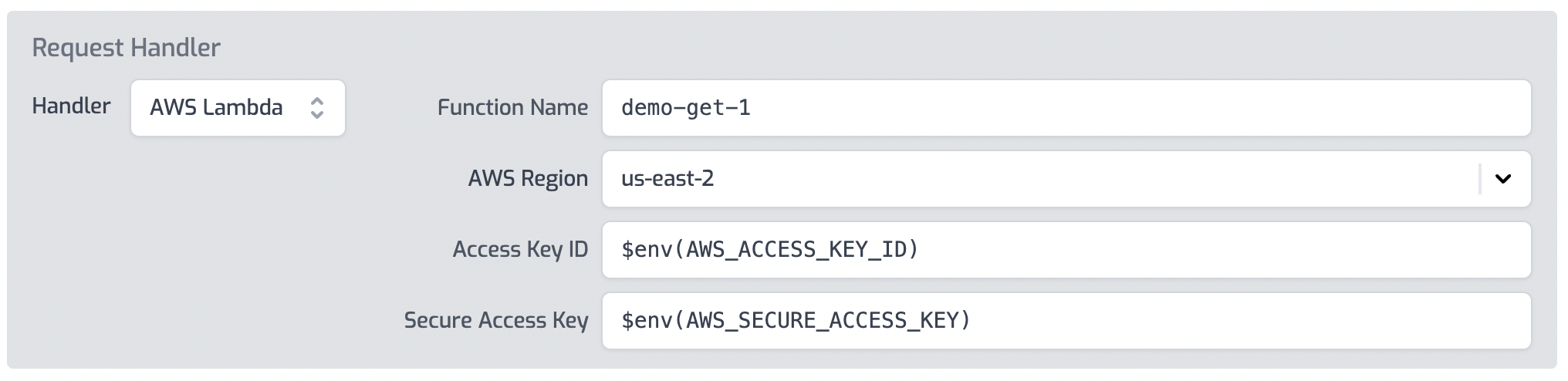
Configure the properties for your AWS Lambda function.
Don't add the AWS Secure Access Key directly in the routes.oas.json file.
Instead use environment variables like $env(AWS_SECURE_ACCESS_KEY)
Setup via routes.oas.json
Set up the AWS Lambda handler by editing the routes.oas.json file directly.
Configure the handler property on any route's x-zuplo-route property.
Code
Options
The AWS Lambda handler accepts the following options:
accessKeyId(required): The AWS access key ID for authentication. Use an environment variable reference like$env(AWS_ACCESS_KEY_ID).secretAccessKey(required): The AWS secret access key. Use an environment variable reference like$env(AWS_SECURE_ACCESS_KEY).functionName(required): The name of the AWS Lambda function to invoke.region(required): The AWS region where the Lambda function runs (e.g.,us-east-2).binaryMediaTypes(optional): An array of content types to convert to base64-encoded strings when sending to the Lambda function.returnAmazonTraceIdHeader(optional): Whentrue, includes theX-Amzn-Trace-Idheader in the response. Default:false.useLambdaProxyIntegration(optional): Whentrue, sends the request using the AWS API Gateway event format. Default:false.payloadFormatVersion(optional): The API Gateway payload format version. Set to"1.0"or"2.0". Only applies whenuseLambdaProxyIntegrationistrue.useAwsResourcePathStyle(optional): Whentrue, converts Zuplo-style path parameters (:param) to AWS-style ({param}) inresourcePath. Default:false.
Binary Media Types
For content types, the binaryMediaTypes option allows specifying which content
types get converted to base64 encoded strings when sent as the body to the AWS
Lambda function. See
AWS docs for details.
Code
X-Amzn-Trace-Id Header
For the purposes of troubleshooting and tracing, it can be useful to return the
X-Amzn-Trace-Id header in the response. This can help correlate AWS Lambda
events or errors with Zuplo requests/responses. This header is disabled by
default, but it can be enabled by setting the configuration option
returnAmazonTraceIdHeader to true.
Code
Compressed Body Content
This is provided as a work-around for certain Lambda + AWS API Gateway migration scenarios and isn't recommended to use on new deployments
The Zuplo handler supports gzip and deflate compression of the content of
the AWS Lambda response body property. In order to instruct the Zuplo handler
to decompress the body content add a property on the outgoing event called
bodyEncoding and set the value to gzip or deflate.
The response event would look like this:
Code
API Gateway Compatibility
The AWS Lambda handler can also call Lambda functions that were built for API Gateway.
Setting options.useLambdaProxyIntegration to true will tell the handler to
call the function with the event format that matches with AWS API Gateway. You
can also choose between the payload format by setting
options.payloadFormatVersion to either 1.0 or 2.0.
The value for requestContext.resourcePath sent to the AWS Lambda function is
the parameterized path of the route. Zuplo uses path-to-regex style paths (for
example /my/route/:param1) instead of OpenAPI style paths, for example,
/my/route/{param1} for routes. By default, the value of resourcePath is the
Zuplo route value. Setting useAwsResourcePathStyle to true will convert the
value to the AWS format.
For more details about the AWS payload formats see AWS's documentation.
Below is an example lambda handler configured for proxy integration with payload format 2.0.
Code